Gemini 4 Carbon, Neon, Hydrogen, and Argon: pricing flips Dec 1 and benchmarks already did
Carbon and Argon’s API rates double on December 1. See how the same token volume can cost $60 on either model, $45 on Neon and $22.50 on Hydrogen.
By
Tenten AI FDE Team
Implementation Methods
Published
Read time
13 min
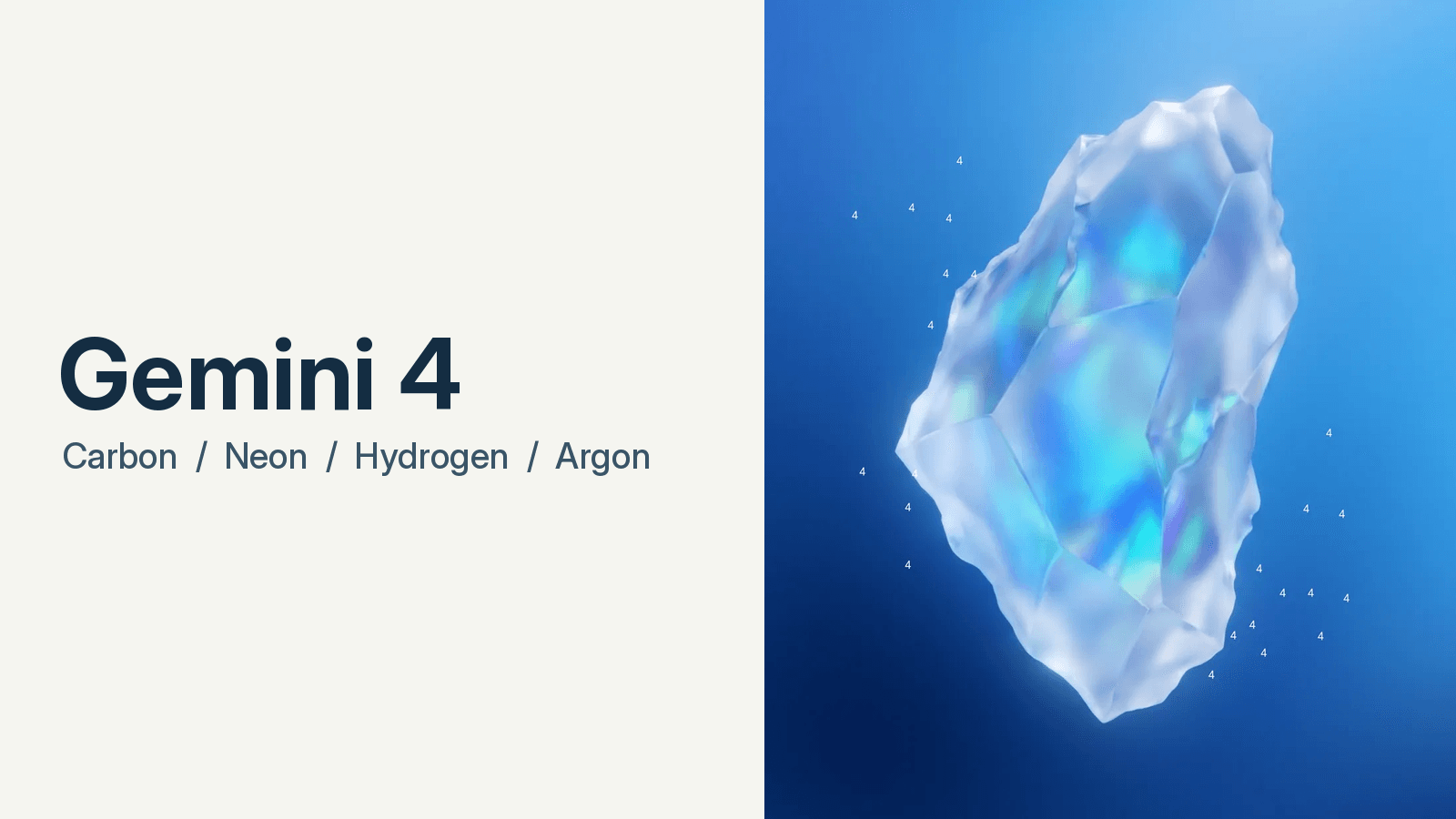
For Gemini 4, trial Hydrogen for routine work, Neon for harder reasoning and Carbon for long assignments. Keep Argon as the comparison if it already meets a production target. Google’s Neon scored 61 at its highest thinking setting on the Artificial Analysis Intelligence Index, one point ahead of Carbon on the same version. Hydrogen also beat Argon, even at Hydrogen’s default setting. For teams buying API capacity on November 25, 2026, there is a second surprise. Carbon and Argon cost less per token than Neon until December 1, when their standard rates double.
The four models can spend different numbers of tokens to finish the same request. Before shifting traffic, measure the price of a successful job on the team’s recent work. Google’s model selection guide
What a Gemini API workload costs before and after December 1
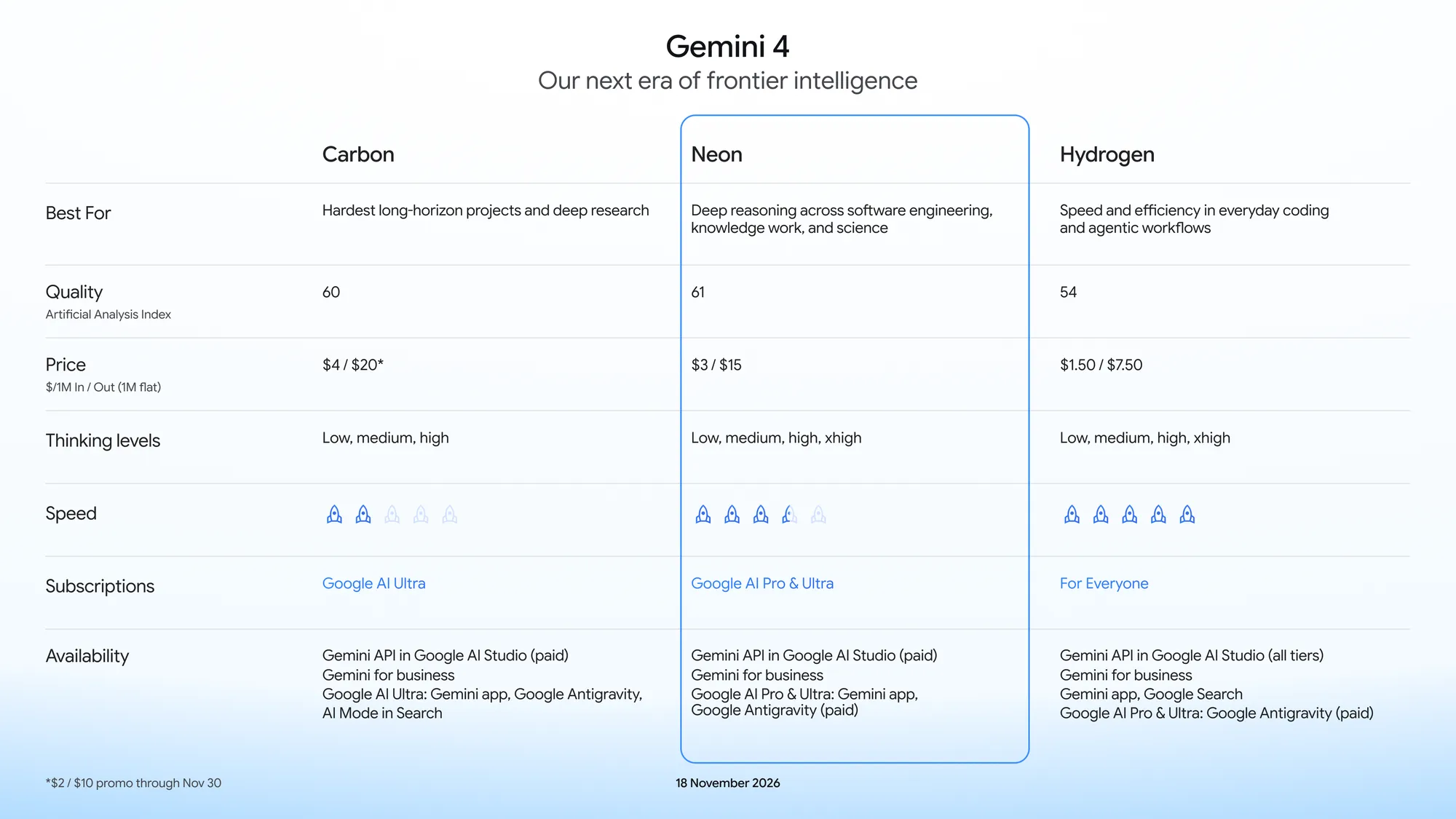
Google lists these standard paid API prices in US dollars per million tokens. Each pair gives the input price first and the output price second. The output price includes thinking tokens. Hydrogen is the only one of these four with a free API tier. Gemini API pricing
| Model | Announced in 2026 | Through Nov 30, input / output | From Dec 1, input / output | Default thinking |
|---|---|---|---|---|
Hydrogen (gemini-4-hydrogen) | Nov 12 | $1.50 / $7.50 | $1.50 / $7.50 | high |
Neon (gemini-4-neon) | Nov 18 | $3 / $15 | $3 / $15 | high |
Carbon (gemini-4-carbon) | Oct 28 | $2 / $10 | $4 / $20 | medium |
Argon (gemini-4-argon) | Oct 13 | $2 / $10 | $4 / $20 | medium |
Consider a workload using 10 million uncached input tokens and 1 million billable output tokens, including thinking. At those fixed volumes, the standard token bill for either Carbon or Argon rises from $30 to $60. Neon costs $45 and Hydrogen $22.50. The example excludes tool fees and batch discounts. It isolates the price change so a budget owner can apply it to last month’s usage.
After December 1, the table puts Neon 25% below Carbon and Argon on both rates. Hydrogen costs half as much per token as Neon. For work that can wait, Google also lists batch rates at half the corresponding standard input and output prices for these models. A team comparing actual costs should also record retries, billable thinking and the number of results a reviewer accepts.
Where Hydrogen and Neon moved ahead on benchmarks
Google DeepMind’s November 12 announcement reported a score of 51 for Hydrogen at its default high setting against 50 for Argon on the Artificial Analysis Intelligence Index. At xhigh, Hydrogen reached 54. Adding a thinking level changes the comparison, so a team testing the default should use 51 as its reference. Google’s Hydrogen announcement
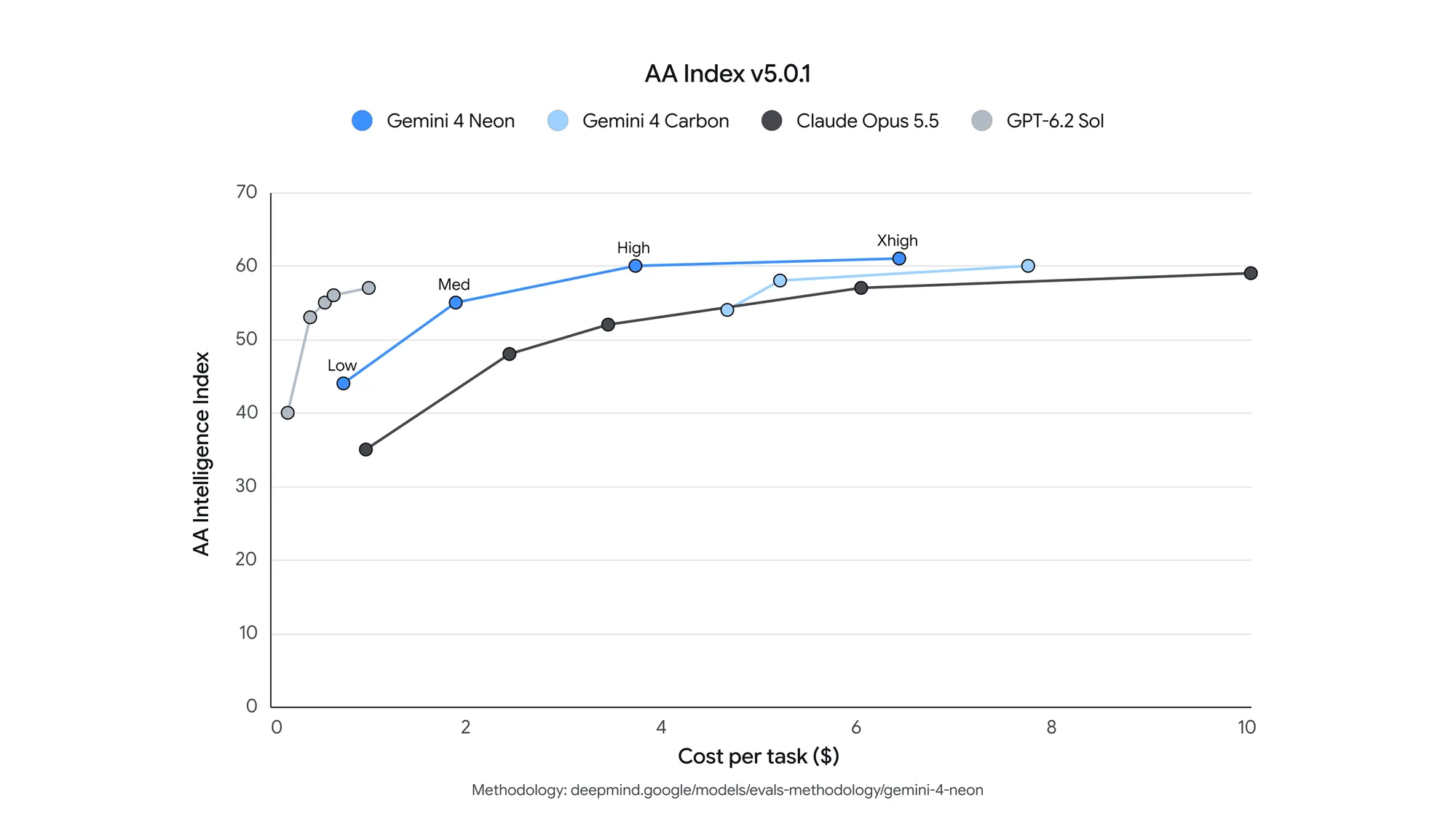
At its November 18 launch, Neon ranked third overall with 61 at xhigh. Google’s chart for version 5.0.1 of the index put Carbon at 60. Carbon’s launch score of 59 came from version 5.0. On a separate evaluation, Google reported 70.9% for Neon on Vals Index v2.2. The announcement identifies xhigh for the Artificial Analysis score. Google’s Neon announcement and evaluation charts
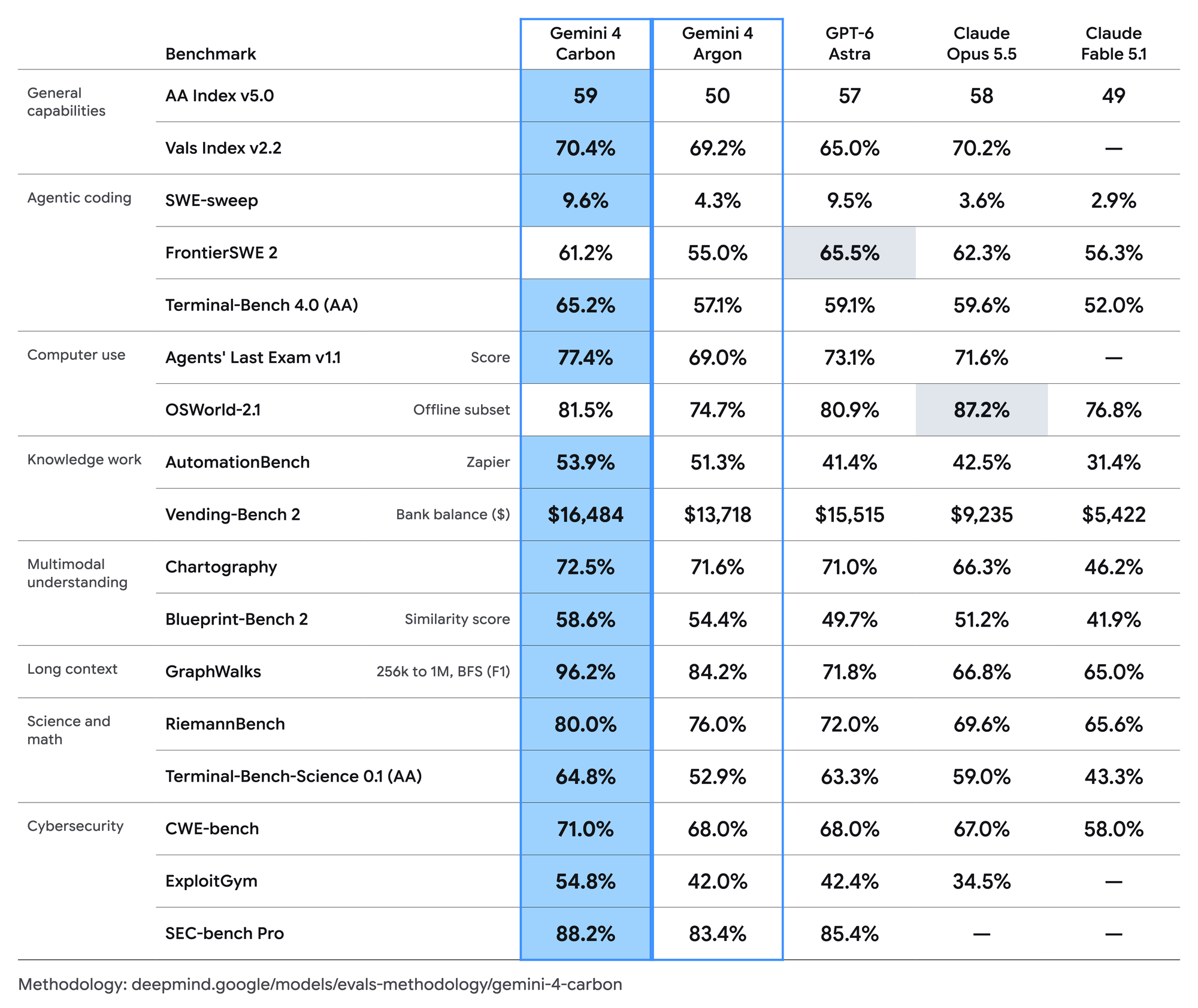
Carbon still led on two measures that matter for longer assignments. On Agents’ Last Exam v1.1, Google reported 77.4% for Carbon, 75.8% for Neon and 69.0% for Argon. On the 256K-to-1M-token GraphWalks breadth-first-search measure, their F1 scores were 96.2%, 95.2% and 84.2%, respectively. These are reasons to try Carbon on a demanding task with relevant material spread across a long input. Carbon launch results · Our earlier look at Neon
What Argon’s absence from Google’s guide means for existing users
Google’s general-purpose comparison table featured Carbon, Neon and Hydrogen on November 25. Argon still had a paid API listing, and Google described it as responding faster and spending fewer tokens per turn than Carbon on complex coding, agentic, math and science tasks. Two models with the same token price can therefore produce different bills. Choosing a model · Argon model card
The four models have a shared 1,048,576-token budget for input, thinking and output, and a default response allowance of up to 65,536 thinking and output tokens. With long decode, a non-streaming generation hop can run to 65,536 tokens on Hydrogen or Neon and 32,768 on Carbon or Argon. A hop is one segment of a continued generation. Large inputs leave less room for the complete answer. Google’s long-decode documentation
How to choose a model for an actual job
Google’s model guide gives an example of planning or isolating a difficult bug with Neon or Carbon, then handing code edits and test iterations to Hydrogen. The guide also suggests escalating to Carbon if Neon gets stuck at high or xhigh. Google tested a mixed configuration in Antigravity. On Terminal-Bench 4.0 its Orchestrator approached Carbon’s task success rate while consuming 24% less quota and finishing 19% faster on average. Those figures describe the test’s quota and time. Model selection guide · Google’s Orchestrator results
For a purchase decision, give the same sample of recent tasks to the candidate models. Record the thinking setting, total billed tokens and elapsed time for each accepted result. Use Hydrogen for recurring edits if it clears the quality bar. Compare Neon and Carbon on the cases where it falls short. Before moving an existing Argon workload, price those same runs at the December rates.
Sources
- Google AI Studio Documentation: Gemini API Pricing
- Google AI Studio Documentation: Choosing a Model
- Google AI Studio Documentation: Long Decode
- Google AI Studio Documentation: What's New in Gemini 4 Hydrogen
- Google Blog: Introducing Gemini 4 Neon (Nov 18, 2026)
- Google Blog: Introducing Gemini 4 Hydrogen (Nov 12, 2026)
- Google Blog: Gemini 4 Carbon: our next frontier model (Oct 28, 2026)
- Google Blog: Gemini 4 Argon: Built to solve your hardest problems (Oct 13, 2026)
- Artificial Analysis: Intelligence Index
- Vals AI: Vals Index
- Google AI Studio: Gemini 4 Argon model card
Summarize this page with AI
Related posts

Start with one workflow.
Agree on the next step.
Leave your contact details and question type. We will follow up by email to understand the work and discuss scope.